Showing posts with label samsung. Show all posts

Friday, April 11, 2014

UPDATE : Galaxy S5: the most hated delight?

We all know that the next big thing was unveiled a month back at MWC 2014. To my and everyone's surprise the device was not what we all wanted it to be. Basically we need to understand that Samsung hasn't made a bad device, the rumours made it. I don't know how many of you saw a leaked box cover of a samsung device which got leaked prior to release. The specs was a 5.25" QHD ( there's a huge difference between qHD and QHD and if you're not familiar its better to use 2K) resolution. 20.7 MP camera, a solid 3000 mAH battery and 3GB of ram.


This is what everyone wanted to see when Samsung was saying "THIS IS GALAXY S5" and when it didn't we all hated Samsung for that. It was not just me but most of the reviewers who were present there were not happy. But later when they got to have a hands on the device everything just changed. Most of them were praising the device for how it has evolved. From the moment the galaxy s5 was unveiled i told +Mathew Poynter that am going to get one and he was saying as i quote was "am disappointed man. This not what i expected". I was sure the galaxy s5 is the one am going to get anyway because i had the chance to realise the betterment of the device in mean time people weren't over the shock of the unexpected specs sheet samung gave in.

There is always two sides for a coin. Yes the galaxy S5 isn't everything that were rumoured to be but its everything a average consumer would want. what is that? you would ask and its as simple as "running with no issues out of the box". Every time Samsung made their breakthrough technologies invested on every galaxy device we always faced issues. Ever since the galaxy S. The galaxy S was an icon of a android devices. Still the issues were pestering the consumers. When the galaxy S2 came out it had issues with the new super AMOLED+ screen and that was one among the first phones to sport a dual core processor home made branding (exynos). The phone was state of the art at hardware thus was good at everything (theoretically) but lacked proper colour reproduction, blue tint to the top corner of the screen, low battery life, poor audio and so on. The galaxy s3 came out and it sported a quad core processor and it had a HD AMOLED technology which they switched back to the super AMOLED and not the same super AMOLED+ used on the galaxy S2. Though it was the hottest selling phone for Samsung till date, its still not the phone where everything is ok. Samsung did not stop there and when the galaxy S4 came out it was an octa core phone with FHD super AMOLED technology and that's where the screen issues mostly were addressed and finally improved drastically. No one knows what would have happened if Samsung's galaxy S5 would have had a QHD display. Why do we need QHD on a phone with the pixel density already super-passing the mark of 320?. We did see the OPPO FIND 7 and we did come to know how much the QHD made the phone compromise on display quality and performance.


Well to anyone's knowledge this is the first time Samsung created a opportunity for itself to fixed all the issues it had carried out till date for all these years. The FHD super AMOLED on the galaxy S5 is one of the best displays out there and this is not just told by me but by the experts from Display mate. It has the Brightest screen every made on an AMOLED and the dimmest too. It has an awesome fluid, well and beautifully polished UX and came out with the least gimmicks ( e.g.heart rate monitor).  They've fill in so many wonderful features into the phone like the ultra power saving mode. It has one of the deepest speakers any galaxy device has ever sported thus making the sound more punchy where its needed and loud enough as well (don't compare with boom sound). To be frank the galaxy S phones were never good with audio quality and to my surprise the galaxy S5 was awesome with its output in ears. The music player has more features that are very useful and the camera is a stellar. If you knew this or not the galaxy S phones always borrowed their camera technology from Sony. For the first time Samsung has implemented its very own sensor which is called ISOCELL. They are not just on papers feels sound  but practically does. Its one of the best cameras you can get on an android device. So being a iterative update over its predecessor isn't a  bad thing. I got the chance to use the galaxy S5 and am not getting into more details about the device because i will be getting my Brand new galaxy S5 tomorrow and the unboxing and walk-through sessions will be live broadcast on youtube along with +Mathew Poynter  on the boat. The galaxy S5 is one of the best phones in its class and i would recommend for one over any other manufacture not because you would am a Samsung fan but to know why and to get your doubts cleared stay tuned for tomorrow. The broadcast time will be posted tomorrow at GMT ASAP i receive my package. keep a check on Samsung Galaxy page on facebook.

UPDATE : The galaxy s5 unboxing and the walkthrough tour will commence by 5 pm GMT or 6 hours from now.  The link will go live 5 minutes before the broadcast starts.
   

Friday, September 27, 2013

Samsung's region SIM lock policy on phones- the most absurd thing ever?


So it recently has been discovered that Samsung has implemented a new policy with its mobile phones requiring the devices to be locked to a specific region and only SIM cards from those regions can be used in those devices. A few people who have purchased the Galaxy Note 3 have noticed the folowing labels on the boxes that their phones came in.

Unfortunately what this means is that if you purchase a Samsung device in say Europe you can not use SIM cards from carriers outside that region. Samsung Germany has apparently already responded to this issue stating it effects all phones sold after July 2013 and is applied to Galaxy S2, S3, S4, Note 2 and 3 models. 

While the geographic regions are quite large with Europe covering all of Europe and the American region covering Canada, the U.S, Mexico and all of Latin and South America this means that purchasing a phone from another region to use outside that region won't work. 

Samsung will allow the device to be unlocked to be used in a different region if its brought to one of their service centers for free but thats not the point here. Currently none of the other OEMs (BlackBerry, HTC, LG, Motorola, Apple, etc) have any similar policies on the purchase of their phones. 

What exactly is Samsung attempting to do with this policy? Are they trying to control the market of international devices being sold globally or is this Samsung's way of forcing customers to purchase devices from their specific area. In the case of the Galaxy S4 and Note 3 depending on which area or country you live in determines which version of those devices you get. In the case of the Galaxy S4, there are three versions of that phone; one with a Snapdragon 600, one with a Exynos 5 Octa processor and in some markets a LTE-Advanced model with a Snapdragon 800 chipset. Depending on your market you get one of the three versions of that phone. The Same applies for the just announced Galaxy Note 3 as currently there are two versions; one with the Exynos 5 Octa and one with a Snapdragon 800. 

As of right now XDA is unsure of if this region lock can be cracked without Samsung because its completely different from a SIM lock some carriers put on phones. You can view the XDA thread here http://forum.xda-developers.com/showthread.php?p=45908977#post45908977

I personally have been a huge fan of Samsung and have owned numerous phones, a tablet and heck im writing this post using a Samsung laptop but hearing news of this region lock has made me reconsider my thoughts on Samsung. They are a great company, offer amazing products but as of lately ever since they decided to have 3 CEOs running their corporate end of things they have made a ton of bad decisions that have hurt them. Galaxy S4 sales have not been that strong due to the fact Samsung offers multiple versions of it, they lost a considerable amount of money this year when market annalists downgraded the value of the company due to potential weak sales. I just don't get why Samsung would enforce such a ludicrous policy on their phones. Just yesterday I had checked out the Galaxy Note 3 and considered buying it but after learning of this policy im not sure if I want to. I have reached out to Samsung for a comment on this ridiculous policy and ill provide an update if I get an answer. ~Mathew  

UPDATE: Android Central discovered Samsung's region lock policy isn't as bad as everyone originally thought. While the devices are locked to a specific region once they are activated with a valid SIM card from that region the lock is released. 
Samsung has also released a statement about the controversial policy. 

"In order to provide customers with the optimal mobile experience in each region including customer care services, Samsung has incorporated the ‘regional SIM lock’ feature into Galaxy Note 3 devices. The product is only compatible with a SIM-card issued from a mobile operator within the region identified on the sticker of the product package. When the device is activated with a SIM card issued from the other region, the device may be automatically locked until it is released at the dedicated service centre.Once a device is activated normally, the regional SIM lock is automatically released. Users can enjoy the roaming service as usual and can use other region’s SIM card when travelling. The regional SIM lock has been applied to the Galaxy Note II and Galaxy S4 devices through a software update in selective markets. The regional SIM lock does NOT affect the device’s features and performance. Users can continue to enjoy all the advanced features of our products."

Wednesday, September 18, 2013

IFA 2013

So this week in Berlin, Germany was IFA, a consumer electronics show that is similar to CES but focuses on products geared towards Europe. This week several key players in the mobile electronics industry revealed new products. In this post we'll take a brief look at these amazing products

First we will start with Samsung, on Wednesday Samsung held its usual IFA Unpacked event where the 3rd generation Galaxy Note smartphone or "Phablet" if you prefer was announced.
Images bellow: Galaxy Note 3 


The Galaxy Note 3 features a 5.7 inch full HD Super AMOLED display, depending on what region you live in either a 1.9 ghz Exynos 5 Octa CPU or a Snapdragon 800 CPU clocked at 2.3 ghz. the device comes with 3GB of RAM and either 32 or 64 GB of onboard storage with an microSD expansion slot. The Note 3 comes with a rear facing 13 megapixel camera that on some versions is capable of recording video in 4K (yes thats right 4K!), it has also a 2 megapixel front facing camera for video chatting. Android 4.3 ships on the device along with Samsung's TouchWiz UI on top of it (which you might like or extremely dislike). The Galaxy Note 3 comes with of course the familiar S Pen but introduces a whole slew of new features and software with it. (ill go more in-depth in a future post)

Galaxy Gear 
So in addition to the Note 3, Samsung announced two other products. One of them is the Galaxy Gear. This is Samsung's first smartwatch and its meant to be a companion for your Galaxy device. At first support for the watch will only be available on the Note 3 but Samsung says that future software updates to the Galaxy S3, S4  and Note 2 will enable support. Non-Samsung phones will also be supported in the future as well. 
Images below: Galaxy Gear 

The Galaxy Gear features a 1.63 inch Super AMOLED display, a single-core 800 mhz processor and 512 mb of RAM.There is a 1.9 megapixel camera in the strap.The Galaxy Gear uses bluetooth 4.0 low energy to pair up with your smartphone and it can display messages, notifications as well as receive and make calls via your phone. The watch also has a small selection of apps that can be downloaded onto it. 

Galaxy Note 10.1 2014 Edition 
The final product Samsung announced during its unpacked event is a brand new version of the Galaxy Note 10.1 inch tablet that was released last year. The new Note 10.1 improves on everything last year's model had to offer. (I used last year's model for several months and I have to commend Samsung on the amazing job they did with the new model because it fixes all of the complaints i had with it.)
Images below: Note 10.1


The Galaxy Note 10.1 2014 Edition comes with a 10.1 inch WQXGA Super Clear LCD display (2560 X 1600) It has a 1.9 ghz Exynos 5 Octa CPU with 3GB of RAM. Android 4.3 ships on board along with TouchWiz. The device has an 8 megapixel rear facing camera with flash and a 2 megapixel camera on the front. Like Samsung's Galaxy Tab 3 line it also has a physical home button and capacitive back and menu buttons for Android controls. Like its smaller brother the Note 3, this device ships with all new S Pen functionality. 

Okay so now to move away from Samsung, lets talk about Sony and the new Xperia  Z1 cameraphone.
Previously known by its code name the Honami, the Xperia Z1 brings the best qualities the Xperia Z and Z Ultra phones have to offer into one device. 
Images below: Xperia Z1 courtesy of PhoneArena 


The Xperia Z1 features a 5 inch full HD display with Sony's TRILUMINOUS screen tech that first appeared on the Z Ultra. It features a 2.2 ghz quad-core Snapdragon 800 CPU with 2GB of RAM and it has 16 gb of internal storage along with a MicroSD card slot. Android 4.2.2 ships with the device along with Sony's UI. The main feature of this phone is its camera. the Z1 features a 20.7 megapixel Exmor RS sensor with a 27mm wide angle lense and F 2.0 Aperture. This phone should be capable of taking some amazing pictures with that camera and oh yeah like the Xperia Z and Z Ultra its waterproof! 

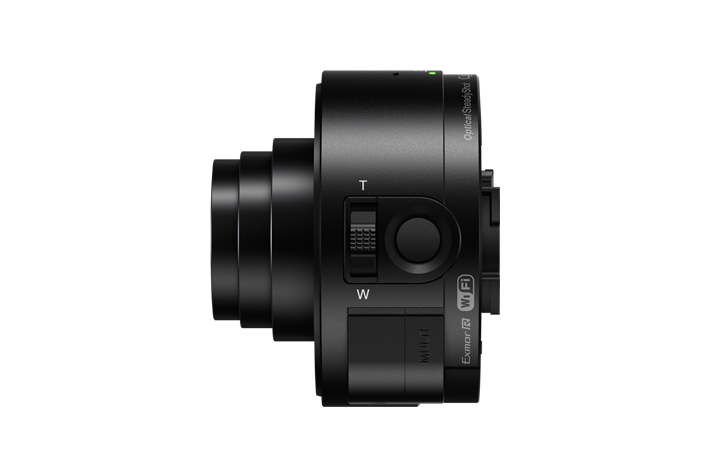
In addition to the Xperia Z1, Sony also introduced two attachable cameras that can be clipped onto any smartphone, giving it the same high quality imaging experience you would find on Sony's cameras. 
The DSC-QX100 Offers Carl Zeiss optics and Sony's amazing imaging technology in a 35 mm 3.6x Optical zoom lens with F1.8 Aperture


The DSC-QX10 comes with a Sony G Lens with 10X Optical Zoom that Sony says should vastly expand your smartphone's potential 

These camera's use Sony's BIONZ imaging processor which Sony promises should deliver accurate color, rich tones with minimal noise 

To move away from Sony, Asus also made several product announcements at IFA 2013. Among the devices where two new FonePads, several tablets and a computer that dual boots Android and Windows 8. ill briefly touch on each 
Fonepad Note 6
This device features a 6 inch full HD display, a Intel Atom Z2580 dual-core CPU with 2GB of RAM and 16GB  or 32GB of internal Storage with a MicroSD card slot. The device also features a 8 megapixel rear camera and a 1.2 megapixel front facing camera. It comes with Android 4.2.2 and has a Stylus much like a device from a competitor I mentioned earlier. 
Image courtesy of PhoneArena 

FonePad 7 
Asus marketed this device as being a Phablet but really its a tablet with phone capability. The device has a 7 inch 1280 x 800 display and runs on the older Intel Z2560 CPU clocked at 1.6 GHZ and it offers less RAM than its 6" brother (the amount is not specified but im going to guess its 1GB) The device ships with Android 4.2 and comes with 8,16, or 32GB of internal storage. It offers a 5 megapixel rear camera and a 1.2 megapixel front camera. The device is intended to be affordable. 
Image courtesy of PhoneArena 
ASUS MeMO Pad 8 & 10 
Asus introduced two affordable tablets, the MeMo Pad 8 and 10. Both of these tablets come with 720P displays, a 1.6 ghz quad-core chipset with 1GB of RAM and Android 4.2. The MeMO Pad 8 comes with 8gb of internal storage and a 5 megapixel rear camera and a 1.2 megapixel front camera. The MeMO Pad 10 comes with 16 gb of storage and only a 2 megapixel rear shooter along with a 1.2 megapixel front shooter. 
Images courtesy of PhoneArena


ASUS Transformer Book Trio 
Of all of the devices ASUS announced at IFA, the most interesting of them was the Transformer Book Trio. The Transformer Book Trio is a device that comes as a tablet with an attachable keyboard dock. The device has a 11.6 inch 1080 x 1920 IPS display and weighs 35.27 ounces. The most interesting feature this device has it dual boots Android and Windows 8. 
Image courtesy of PhoneArena 
Now how the ability to dual boot OSes works is when the device is being used solely as a tablet, its running Android. The tablet itself has a dual-core 1.6 ghz Intel Atom Z2760 processor with 2 gb of RAM. It also comes with a 5 megapixel camera on the rear.  When the device is attached to its keyboard dock it runs a full version of Windows 8. The keyboard dock has its own hardware necessary to run Windows which includes 4GB of RAM and a Intel I7 Haswell processor and 1TB of storrage. The keyboard dock interestingly though can be hooked up to a external display to function as a PC. 

ACER Liquid S2 
Finally the last device i want to touch on that was announced at IFA is the Acer Liquid S2. Acer didnt have a huge presence at IFA but this device caught my attention because like the Galaxy Note 3 it can record video at 4K resolution. The device features Android 4.2.2 with Acer's custom UI running on top of it. Its powered by a 2.2qhz Qualcomm Snapdragon 800 CPU with an Adreno 330 GPU and backed by 2GB of RAM. It has a 13 megapixel rear-facing camera that is capable of recording video at 4K resolution. The device has a 6 inch 1920 x1080 IPS display and a 3300 mah battery. 
Image courtesy of PhoneArena 
So that about wraps up the major product announcements from IFA 2013. Sure there were others but these were the most significant. IFA this year i found to be more interesting than CES was and now we wait till CES 2014. I appologize for the lack of updates to this blog as myself and Sabareesh have been quite busy lately. My next post will be about the Galaxy Note 3 and a indepth look into its features. I may also choose to talk about my thoughts on the Note 3 and the direction Samsung is taking its mobile business. I will try to have that up soon. -Mathew 


Wednesday, July 3, 2013

SAMAUNG GALAXY S4 AND THE big.LITTLE technology. A story untold

INTRODUCTION:


CPUs are one of the essential parts of any electronic gadgets we find today. They are sometimes clocked from even 50Mhz to 2.3 Ghz in the mobile industry and on the pc market we all heard the AMD announcing the new processors having a maximum clock speed of 5 Ghz which is mind blowing.


The mobile processing is quickly covering up the gap between pc performance and in no time phones will be capable of what an average laptop or pc can do and its not gonna surprise me if its gonna happen next year as we know ARM's A-50 A-57 is on works that supports 64-bit processing. Well lets hold our horses and get back to a not too old iteration and a brand new leap into mobile computing. Yes right from the heading you obviously know am gonna talk about the exynos 5 octa. Whats so special about it that we are looking on to it again? there's a lot happening on it and here i am to discuss a lil more deep about it.

EXYNOS 5 OCTA:

ISSUES:

So far we know exynos octa was the very first processor that has adopted ARM's revolutionary big.LITTLE technology which too far complicated to make it, it has 8 cores of which 4 will be A-7 and the other 4 will be A-15.

The deal about the big.LITTLE is that they only allow 4 cores to work at a time but it can be any 4 of the 8 and on any combination which lead to a better performance boost and also makes battery to last loger. In reality linux kernels wasn't mature enough to spot the difference between a power saving A-7 cortex and the high power processing A-15 thus samsung managed only to make it work in a manner where either 4 A-7 cotex core or 4 A-15 cortex processors could work at a time. It was totally different from what they demonstrated at CES 2013 and everyone including me was totally disappointed about it. I must say that this is a problem with android or any linux based os because all the cpu gpu threading and governing is done by them so only if the kernel has a better understanding on the processors is when you get better performance. As the exynos octa used on the galaxy s4 (GT-I9500) is running android they didn't have better coordination between the kernel and processor as the lack of support of architecture by linux resulted in overheating issues and also affects the software till date in some or the other way.

FIX:

Linux foundation so far has done its best to introduce newer architectures to support as they are big time opensource company so far and they have taken another leap forward to prove it again with adding the support for the big.LITTLE architecture after so much of hard-work on the kernel version 3.10 which is at its final stages on release. Thanks to Linux godfather Linus Torvalds has certified that the official Linux kernel 3.10 is now in its final state; and, as far as our audience is concerned, the big addition to the Linux kernel is with enhanced ARM processor support. Specifically, the Linux kernel 3.10 has added support for big.LITTLE.

 Linux kernel 3.10 is now final -- paving the way for its inclusion in a bevy of Linux distributions, and even offshoots such as Android and Chrome OS. The fresh kernel brings a good number of changes, such as timerless multitasking, a new caching implementation and support for the ARM big.LITTLE architecture. In simplistic terms, the new multitasking method should help improve performance and latency by firing the system timer only once per second -- rather than 1,000 times -- when tasks are running. Meanwhile, users with both traditional hard drives and SSDs will find performance benefits from bcache, which brings writeback caching and a filesystem agnostic approach to leveraging the SSD for caching operations. Also of significance, Linux kernel 3.10 enhances ARM support by including the big.LITTLE architecture, which combines multiple cores of different types -- commonly the Cortex-A7 and Cortex-A15 -- that focus on either power savings or performance. 

CONCLUSSION :

I personally feel that we are yet to see the actually power of the exynos 5 octa and the kernel 3.10 is the right thing to do on updating it to all the devices running it. Samsung was all this time helpless to make people happy with the octa core phone as the kernel didn't support it and now its really a great time to make things right and make its customers happy. I wish samsung brings it up as a stability update for the device like it did previously with a 28Mb updates that always tweaked the kernels than getting it as an update with the newer version of android its too long to wait. I feel once the exynos octa get the 3.10 linux kernel we will surely get 20hrs of battery life on heavy performance and more than 2 days of battery life on a average usage and that's one thing we need the most now. Fingers crossed on hoping samsaung will work on it to straightening thing up for the users. Am really looking forward to it!. Just can't wait. how about you?.

Wednesday, May 29, 2013

Reduce lag on any Samsung Galaxy device by going into developer options and limiting background process

Do you have a Samsung Galaxy S4 and are you frustrated with the fact that the smartphone has a considerable amount of lag? 

The Galaxy S4 really is an amazing smartphone with some pretty amazing specifications, as powerful this phone is with 2 gigs of RAM and either a quad-core 1.9ghz Snapdragon 600 CPU or the 1.6ghz Exynos 5 Octa CPU the phone still suffers from lag issues. This is because of Touchwiz mainly, Samsung's skin comes with tons of features that we could spend all day discussing but we wont and it is very resource heavy on the phone. With all of the enhancements and software features, the phone's internal storage is limited and many of these features run simultaneously whether or not if your using them. The phone has 2 gigs of RAM which should help its performance but in this case its not enough as often the user is left with less than 500mb of free RAM due to all of the various features and preloaded programs that run in the background. 

A good way to reduce the lag and increase the performance of your device is to go into the developer  options and limit the number of background processes the CPU can handle at any time. This works on not only the Galaxy S4 but most other Samsung Galaxy devices with the exception of some older models like the Galaxy S. 

To change the background processes count you need to access the developer options menu in the settings which may vary based on device. The Galaxy S4 has a pretty crazy way of accessing the developer options by taping on the device's Android build number multiple times in the about phone section. Most other devices have a section dedicated to developer options in the settings menu. 

Below is a screen cap from the Galaxy Note 10.1  showing the developer options section in the settings menu

Once in developer options, scroll down the Apps tab and select Limit Background processes and change the value from standard limit to 4 at most. 

Clicking on Limit background processes brings up a dialog box where you can change the values, select 4 processes at most as this is probably the best setting. 


After changing the background processes limit, you should notice a significant improvement in the device's performance. On the Galaxy S4, this reduces lag and even fixes the camera bug where clicking on the camera application in some cases can cause the device to malfunction and reboot itself. RAM consumption is also reduced as there are fewer programs running in the background. 

RAM consumption with no limit on background processes, no apps are running

RAM consumption after changing the limit on background processes to 4


As you can see with no applications running and the limit changed to 4, the amount of RAM being consumed by the system was reduced by more than 10 megabites. That might not seem like much but it does make a difference when you are using applications.

As helpful as this is, I should note that these settings when you change them are not permanent, when you restart the device it goes back to the default setting of  no limit. So you will have to change it again. 


Saturday, March 9, 2013

The HTC One

Introduction
What's not to love about it. The single sheet of aluminium built and the ultra pixel camera and the HTC boom sound. Is that it? There is more than that meets the eye. Its just 7.3 mm thick with a 4.7" display with super lcd3 display technology. Due to smaller screen size it was possible for the manufacturer to bring the pixel density or ppi (pixels per square inch) to 468 which is an amazing breakthrough super passing the retina display. It has beats audio backing it up on the sounds and music. HTC managed to being in dual speakers which are pretty wide and will hit you to your face when you take the phone on hand looking at. With 93db its quiet loud enough. The 4up (ultra pixel) sensor seemed to do what it has promised and on the whole the HTC one stands to its name.

Pros
With the Qualcomm snapdragon 600 ticking at 1.7 GHz it functions flawless and thanks to jellybean there are no break frames or glitches while processing anywhere. The adreno 320 serves best when it comes to graphics processing. On the whole the phone really is an wonderful multimedia masterpiece. With 2gb of ram it can have more standby apps or can process high definition programs, applications or games. Now that's one to do them all. On the software part the HTC one comes with the new sense 5 UI which is far simpler compared to the previous iterations. The blink feed is a boon for news lovers. Your news is one touch away to update you. Its never ending and one gets to customize what they want to see or what interests them to see on the blink feed. That's innovation. The app drawer looks more holo thus making look more polished.everything works super smooth on the HTC one. Am not a camera person so am not gonna talk about the Zoe but have to say you have many things you got to do with the HTC one.

Corns
To my disappointment the HTC one comes out of the box with 4.1.2 though 4.2.2 was available right from November. Though everything is amazing and blazing fast to the hardware and the premium built quality the part where HTC never satisfied android lovers is on the UI. HTC always makes a tip to toe customisation on the android versions by thus makes it looks a lot unpleasant. The apps are now customized according to Google's holo theme and when you run them on the HTC one they really do look awkward. It feels as if those apps are ported from another os to the HTC's. The whoe of sense is  a lot disappointing as you can see all the manufacturers are trying to get their custom skins close to Google's stack to give users a uniform experience but that's where Sony and HTC are lacking. In the sense there is no widget drawer. We get to add widgets only from the home screen. You can't move apps from the app drawer to the home screen by continuous hold on the icon as again if you want it in the home screen get it from the home screen. Multitasking look a lot similar to the Nokia's N9 meego running smart phone. I really didn't like the sense 5. That's one thing that's keeping me away from buying that phone as there is no android experience. It may not matter to many but to me when it comes to an os there should be some pure experience of it. Samsung's touch wiz offers a pure yet coloured Google experience which I love to use with the touch wiz nature ux. On to of all that the 2300mah batter can't give enough juice for heavy users. A super phone that need more juice might run out of power so make sure to carry your charger where ever you go.

Conclusion
HTC one is an amazing phone to have around. HTC lovers are up for a treat. For users who don't like the user experience do wait for the next best thing. Well I am waiting.. Are you?

Monday, October 22, 2012

Samsung to make exynos open source

good new to everyone, samsung has finally acknowledged the lack of documentation for the exynos powered phone like the galaxy s2, galaxy s3, galaxy note and the note 2. as custom roms like cyanogenmod has more than 2.5 million users samsung has come up solution at the big android bbq stating that they will release the necessary documentation requested by the developers and also said that they would release the necessary documentations for the mali gups! now that's a wonderful news. there is a strong belief that the documentation will be available before december. now this is something to celebrate on. ill keep you updated on further information in a while. 

Friday, October 19, 2012

Samsung Galaxy s2 jelly bean 4.1.2 update

Samsung galaxy s2 jelly bean 4.1.2

This is a review on the galaxy s2 i9100 running the Android Open Source Project (AOSP) coded by Cyanogenmod running Cyanogenmod 10 Nightly

There are certain things i want to mention about Cyanogenmod. They are really doing a great job developing the AOSP without shifting the phase where we liked things the google way. They are really working hard and i would really like to mention that still the galaxy nexus hasn't received the 4.1.2 update yet. But the cyanogenmod team merged the codes within two days of the source codes were made available at the AOSP. along with the stack features cyanogenmod has made many cool features, notably the pop-up messaging and the power widgets to toggle wifi or bluetooth, but unlike the samsung's roms we have the freedom to choose what we want to have in the power widget and how many with boundaries. There are many more but you will realize it only when you use it.

Coming back the jelly bean 4.1.2
well i got to say that am really impressed how smooth and beautiful the OS feels though not as much as the windows phones because THE PROJECT BUTTER couldn't be implemented as SAMSUNG has still not released the SOC(system on chip)for the EXYNOS chipsets DOCUMENTATION for the developers and its quiet notable that all the other chipset makers  like qualcomm, Texas Instruments and Sony have always made sure the developers get the codes asap, thus no butter, no JELLY BEANaudio( still runs on the cracked ICS documentation) support and no proper hwcomposer support and still they have managed to run the OS so smooth till now. do ask samsung at twitter @SamaungExynos to release the source codes. more the requests sooner there would be a solution and thus the benchmark results have also gone a few hundreds down on the quadrant 
as you see the score is low compared to the samsung's rom and so it reflects while playing some high end games like asphalt 7 heat, The Dark Knight Rise and so on. They run a little choppy. not such a huge difference though still you feel it.

INTERFACING

looks the same as the ICS but with a lots of changes on the screen 
you must be aware that in the nexus phones and the nexus 7 the google search bar stays to all the page you scroll over and in the cyanogenmod you have an option to remove the search bar. As this being the AOSP there are everything that you get what the nexus runs like the google now and so on. but before getting there the UI of the jelly bean is actually refreshed in terms of transition which are so gorgeous and beautiful and with PRJECT BUTTER i bet its going to make it even more fluidic and beautiful. the UI is quick and very responsive. The app drawer is the same as the ics but you will feel the difference on the widget section.
you can see the beautiful smooth edges and layout compared to the ICS. Looks a lot better. its not just about the looks but feels completely different on the performance and the way it works from ICS.

NOTIFICATION BAR & NOTIFICATION DRAWER INTERFACING

The notification drawer on the Jelly Bean is  completely refreshed from the ics. there are so many new features unlike the ics had (swipe to clear notification)
as you are seeing the notification drawer you can see the power widgets below the clock and its my frequently used once i choose to have there. once you swipe from the top of your screen and pull the notification draw it follows your finger so smoothly and there you see a big and beautiful clock on the left corner and the date and day mentioned next to the clock. there is short cut to get to settings and the clear all button to the right corner and have to say all of this alignment looks a lot beautiful and mature than on the ICS. the next noticeable thing will the the notification with a small icon on the left corner mentioning what it notifies and it makes a lot of sense. all these makes you to understand what kind of notifications you have received at a glans which is a lot helpful when you are driving or when you are using your phone during class hours. its really nice how the notification drawer works and the bottom grey border glows blue when you touch it and it adds more beauty to it.
Excluding this there is this option to expand and collapse the notifications like for example you see the screenshot where it shows the screen shot icon is the expanded form and the collapsed ones looks like the other notifications. this feature works on all google apps and developers who are willing to add this feature to their apps. trust me this works with a single hold and pull down and pull up to expand and collapse the notifications and with one swipe from the top to bottom you can open all expandable and collapsable notifications which is really cool which covers the initial level of interfacing.

even the settings have been a tweaked a little and cyanogenmod coded has the follow deeper interfacing features 
as we see under INTERFACE we got
LAUNCHER
LOCK SCREEN
THEMES 
SYSTEM

let me go in the order

LAUNCHER

The launcher is something we are familiar with this doesn't mean cyanogenmod is using something like nova launcher. Everthing is stack and this launcher is suited to execute more features. once you enter the launcher this is what you see.
and here we can see a variety of options for further customization like home screen, drawer & general.

HOME SCREEN

this setting deals with the complete customization of the home screen and its completely flexible.
now its needless to say as you are looking at it. the grid size option gives use the option to have 4x4 up to 7x7 in one screen and thats really amazing. its like completely utilizing the screen space depending upon the user's needs. it really gives you an option to choose your layout. the number of rows and columns from 1-7 and they can be selected the way you want, even 1x7 or 7x4.

the homescreens lets you have up to 7 of them which we get on a samsung's rom just by pinching the homescreen to add and remove, in this case you choose it here.

the default screen option is really one good way to keep a default screen which can be one among the 7 you like. such feature is available on the samsung galaxy s3's nature ux and not in the touch wiz 4 yet. this feature is  really convenient.

the vertical and horizontal padding is about leaving the border spaces and i don't think anyone would like to change that as everyone wants the full screen in use don't you?. you may feel " why do i need all this" its just the freedom you get! using and not is up to one's interest.

i have already mentioned on removing the search bar on the homescreen and here is where you remove it if you don't want it.
 this is something really amazing on the RESIZE ANY WIDGET. this lets you resize the widgets which are no resizable too so it acts like the windows phone 8 homescreen, as bigger the icon is dragged it gives more information and when you make it small it becomes as small as a normal icon and i love the window phone 8 like feel. knowing or unknowing cyanogenmod had this feature from ics so can't actually say its a windows phone 8 kinda feature. so this option is really interesting to people who like having a lots of widgets to their apps

the hide icon label is the black label that appears below every icon on the homescreen to highlight the app's name you can see in the above screenshots.

DRAWER


in AOSP when swipe along the pages it goes to the widget drawer when the app pages are over. this stops that from happening. all these may seem to be small features but all these come under the comfort zone and absence of these might be annoying. 

GENERAL

this doesn't have so much to do but one of the most interesting feature. auto rotate screen. that doesn't mean inside the apps but even on the home screen. this feature was available from ICS but this was made available by google officially from this 4.1.2 and that too for tablets and am not sure whether this feature will be hitting the phones. some symbian users love this feature as all the symbian devices had this and its here.

with all this the complete interfacing and interfacing customization of the homescreen is completed

LOCK SCREEN
the android lock screen from the ICS had only two options. swipe to the left for the camera and to the right to unlock the device. this went through a small change in the jelly bean where you get the google now to make the smart assistant to assist you. but cyanogen mod when a step ahead and gave us the freedom to add few of our favorite app to the homescreen with no boundaries, which includes messaging, music games and any kind of application that is installed in the phone

as i listen to music a lot i have added my play music to the lock screen and it simplifies my task by going to they player by just swiping to the play music icon. 


this lock screen options are the once with AOSP thus has screen security which has options like pin,pattern, slide, face unlock, password.


the none makes  the power key to lock & unlock your phone without any unlocking patters or gestures, even that's a welcoming utility.

but still cyanogenmod has something more to surprise us. i use the slide unlock and when i get into that setting i see more things to customize. after i press the lock button you can set a delay too if i feel the need. you have an option to even unlock your phone by using the menu key or the middle button on your phone.
there is quick unlock option for those where one uses a password or a pin where you need not  enter the ok or the enter button to make the device recognize your key, if you key in the right password\pin your phone unlocks and that's a cool feature too.

you even have this option to have the clock in the right middle and left. the battery status is a new feature that show the battery status on the lock screen and there is an option where you can view it all the time on the lock screen or only during charging, some other stack features are viewing the weather and calendar on your lock screen notifying your events and alarms and so on. other than this you have this option to display the owner's information on the lock screen.

THEMES
one of the most loved features is the themes and this was completely dead with symbian. when i had a nokia phone i use have so many themes that made the look and feel of the phone better and more interesting to use, i really appreciate cyanogenmod for bringing it back and give it to android. more than launchers i personally feel that the themes give better look and feel for the device as they are light and just a cover that acts over the OS but the launchers run as a separate application and drains the battery. everyone likes themes and i hope there would be plentiful themes available for the cyanogemnod just like how symbian devices had during those days.

SYSTEM

the system part of the interfacing take you to more deeper into customizing what we see and what we want to see when we wake up our device.


STATUS BAR
this is where we see the battery icon, the signal the clock and the other notifications icons. here we get to set the cock to show the am/pm, you get to see your battery in a circle within which the % will be mentioned or you can even hide the battery status and the same applies for the signal strength status. people who look for more notifications on the status bar will be really glad with this feature though you won't know your basic details if you are going to hide them.

NOTIFICATION DRAWER

as mentioned earlier they let you enable the power widgets on the notification drawer and apart from that you not only get to chose what power widgets you want on the drawer bout also the order in which you want it in.

POWER MENU

the power menu show the options to add like reboot menu, screenshot and profile switch

HARDWARE KEYS

you can use hardware buttons to perform talks depending on the number of times they are activated and we get to choose the pattern and the activity that will take place when activated.


this the new accounts layout which would be very much know to the iphone users and thus that same system of accounts layout has been deployed with the ability to have multiple accounts from one application which is really cool.

PERFORMANCE

am not talking about the phone's performance here. there is this setting called performance in the settings menu which help you save power or work with performance


this doesn't mean you can over clock your cpu. there  are modes like on demand, userspace, power saving and few more where the clock speed is adjusted depending upon what we want. power saving gives up the gup usage and thus the phone runs a lot choppy and the phone processes in around 200-500 mhz. these clock speeds doesn't exceed the 1.2 ghz that we got out of the box.

well i would say a cyanogenmod is always better than the samsung rom. and this very quick updates form cyanogenmod is really one thing to celebrate about for the flashaholics. as i said everything is really good about the cyanogenmod running galaxy s2 but the lack of the soc documentation for the exynos chips really bugs me as we don't get to fell the full power of the exynos and the mali 400 monster gpu in the s2. because of this there is no project butter too on the s2 as mentioned. but samsung has told that they are working on to settle down this issue. but when the jelly bean rom from samsung gets released for the galaxy s2 i am sure the butter and lot more problems will get solved but nothing can make the device better until samsung releases the documents. hope it happens soon and due to the lack of this the battery performance is a little poor but the phone is really fun to use. my say will be once your warranty gets void its worth rooting and flashing your phone with cyanogenmod.